Thursday, May 27, 2010

Free MB663UB-1S-1 2.5" SATA Mobile Enclosure!


Greetings ICY DOCK Users!

Here is a chance to get some free products! We are looking for all Icy Dock users, especially professional users who work with various types of media such as music, photos, and video. We want to hear your thoughts about Icy Dock products; design, features, etc. Additionally, for our professional users, send us some information about you and the work you do. See below for a sample of what we are looking for. 

In return for your generosity, we will send you a 2.5" mobile enclosure for free! Available while supplies last.

If you would like to be featured, please send an email to tech@icydock.com, and please include the following:

For all users, please include items 1 and 6, or more if desired. For professional users, please include all or most of the items.

1. Name (or Alias) and location
2. Profession
3. A link to your website
4. Noteworthy projects or work you have done
5. A paragraph or two describing yourself and your work
6. A paragraph or two describing your experience with Icy Dock product(s)
7. A picture you would like displayed (yourself, a logo, or work that you have done)

ICY DOCK Testimonials Page Sample:


As we receive responses, we will be adding them to our page. Once our new website is complete, the page will be carried over.

Free gifts will be sent out with 4-6 weeks of receiving the entries. And remember, there are limited quantities. Gifts are limited to the USA only.

Please feel free to contact us with any questions, comments, or concerns. We very much look forward to hearing from all of you!

Cheers,

Team Icy Dock

Friday, May 21, 2010

Icy Tip: A Small, Cost Effective Server for Your Home or Small Business to Host Files and Other Media

Setting up your own file server is no easy task. Normally, people go the route of using an old PC or they build a new one from the ground up. Then comes choosing the right operating system and setting it all up. This process can take a single day, or weeks depending on the user's technical skill level.


The folks over at Code Lathe have made things much, much simpler. Using their TonidoPlug, a user can have a file server complete with software and hardware up and running in less than an hour. All you need is the TonidoPlug and a USB storage device, such as the Icy Dock MB561US-4S-1.


Our friends at Code Lathe were kind enough to send us an evaluation unit to test out with the MB561US-4S-1, and we have written a small review to touch on the many features the plug has to offer.

What is a TonidoPlug?

TonidoPlug is a tiny, low-power, low-cost home server and NAS device powered by Tonido software that allows you to access your apps, files, music and media from anywhere.

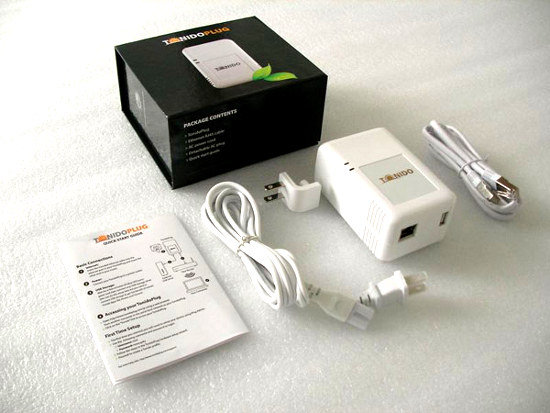
(Contents of the box) 

Initial Thoughts
After opening up what I can only describe as a very elegant box, I discovered that the plug was smaller than I anticipated. It included the power cord and Ethernet cable, and the plug itself, along with some documentation and simple instructions on how to set it up for the first time.

One thing I noticed that I was not aware of was the plug's ability to use a power cord which connected to the top of the plug, rather than the back. That being said, it also comes equipped with rubber feet on the backside so that it can lay on a desk or shelf. To me, this was a relief. I was trying to figure out how I would situate the device without it being behind my desk or just being stuck on the wall. Things were looking good already.

Setting It Up

Getting the plug up and running for the first time could not have been simpler. As I mentioned, the packaging included a small instruction sheet for setting it up the first time. You enter in a URL in your browser which detects a TonidoPlug on your local network. Now if for some reason the plug is not detected, like in my case, there is an easy way to manually find it. Using the MAC address on the back of the device, you can search for it rather than having the software automatically detect it.

After this, you enter your Tonido software running on the plug and go through the standard set up; setting a password and account name, network settings, etc, etc. The account name chosen is how you access your server. (e.g. icydockusa.tonidoid.com)

Finally, setting up our MB561US-4S-1 Quad Bay External Enclosure was the easiest part. After getting the 4 drives attached to the EZ Slide trays, we loaded them into the box and then connected the USB 2.0 cable to the plug. The power was switched on, and the 4 drives, formatted using NTFS, were instantly connected and ready to go.

Interface and Features

We tested the TonidoPlug using our MB561US-4S-1 with four 3.5” HDDs, each one with a different capacity. To get the most out of our enormous storage space, we decided to load up each drive with a different type of media. There was no method to this madness; it was simply random files and file types on each drive. However, having 4 drives does allow for better organization, separating them by file type or media. For example, a user could have separate drives for movies, pictures, music, and documents. 

The first thing to notice is the interface. It is a very user friendly, and an extremely clean and pleasant design. Each feature is clear to the user, and is organized neatly.

(Home screen of web interface)

Now, to view all storage devices connected to the plug, we can use the explorer application, which gives the user the ability to browse all drives and their contents.

(View of all mounted volumes in Explorer)

Using explorer, the user can also create folders, download files, and upload files from the machine they are using. Also, looking to the left in the picture above and below, you can see quick links for commonly used actions such as share, rename, copy, and delete. These quick links are shown for each file, folder, and drive when using explorer, making it very easy to manage your data.


(View of single volume in Explorer)

Needless to say, the people at Tonido have gone through great lengths to make a beautiful and fully functioning piece of software. Everything can be done through your browser, from anywhere with an internet connection. However, to make it even easier for you, using WebSharePro (included free with the Plug, but $15 otherwise), you can create a shared volume or folder that can be mounted as a local drive. To show this, I created a shared volume with one of the drives and named it “usb” and allowed a user of name guest to have download and upload capability.

(Setting up a shared folder in WebSharePro)

(Shared folder mounted in Mac OS X)
  
As you can see above and below, the drive mounts as if it were a normal drive connected to the computer, allowing you to manage your files with Finder in Mac OS X or Explorer in Windows operating systems.

 (A screenshot of an upload in progress)

What this review does not touch on is the other countless features and applications included in the Tonido software suite. Below is a list along with a short description of some of the applications that I thoroughly enjoyed playing around with.

Torrent: Allows the user to download torrents directly to the plug’s USB storage. Start, pause, and stop transfers, and manage the network settings like upload and download speeds.

Jukebox: Make your entire music library available via the Tonido interface. Make playlists and share them with anyone.

Money Manager: Create a financial profile that lets you track your expenses and assets.

Photos: Upload your photo library and share it with anyone. Also included is the ability to create photo albums and slideshows.

Back Up: Fully functional back up utility. It has potential to be a RAID1 alternative by having a drive connected to the plug mirror itself to another drive connected to the plug. 

Final Thoughts

Icy Dock approved! Here at Icy Dock, we have a very high standard of quality that we adhere to, and the TonidoPlug has met our expectations. I consider the entire software suite and hardware to be something I would be happy with, however there are some features I wouldn’t mind seeing in future releases of the software and hardware that could sweeten the deal.

Software

*Document editor for quick edits.
*A RAID 1 type of setting for USB storage. Obviously this can be done utilizing Back Up, but a preset function would be nice too.
*Improved browsing capability for Jukebox, something similar to iTunes or Windows Media Player; browse by artist, song, or album.

Hardware

*An eSATA port. Port multiplier support is not necessary, but would be welcomed if possible.
*An additional USB port. Getting away from a hub with a power supply would be ideal, especially if one wanted to connect a couple of mobile drives to the plug.

Obviously these are more personal preferences however I am sure other users are looking for some of the same things.

For more information, please check out the Tonido (www.tonido.com) and the TonidoPlug (www.tonidoplug.com) websites for more information. I also highly recommend following the CodeLathe blog (http://www.codelathe.com/blog/) for Tonido software and hardware updates.

A huge thank you to Tonido for giving us the opportunity to play with the TonidoPlug and see how great it really is!

Cheers,

Team Icy Dock

Tuesday, May 18, 2010

HomeServerShow.com Hosts the Icy Dock Wallpaper Contest!


Our good friends over at HomeServerShow.com are hosting an Icy Dock wallpaper contest. There are some great prizes, especially for those of you looking to beef up your home or small business server. Here are the details:
Contestants have a chance to win one of three prizes. To be eligible, contestants must submit an original desktop wallpaper highlighting Icy Dock and/or their products. The wallpaper is to be 1920x1200 pixels and sent as an attachment or link to podcast@homeservershow.com by June 7, 2010. Winners will be selected by the hosts of the Home Server Show Podcast and announced in June 2010. Wallpaper submissions will be posted on the HomeServerShow.com and discussed in the forums.
Prizes:
1st – MB561US-4S-1 External USB & eSATA Multibay


2nd and 3rd – Choice of MB668US-1SB 2.5” external SATA to USB Single Bay enclosure or MB882SP-1S-1B 2.5” to 3.5” Internal SATA adapter


Honorable Mention (Limited to 10) – Origami Hard Drive Case


Selected wallpapers will be featured on the HomeServerShow.com. Winning entries may be hosted on the IcyDock website for promotional purposes. By submitting an entry you agree that IcyDock and/or HomeServerShow.com can use your submission for promotional purposes.
Submit your entries to podcast@homeservershow.com by June 7, 2010. You can e-mail the wallpaper or a link to it. HomeServerShow.com will get them posted to the forums for all to see. If your not a graphics artist expert don’t worry about it! We want to see your submission!
For more information, please check out the blog post at HomeServershow.com.

We look forward to some very creative entries!

Cheers,

Team Icy Dock
Thursday, May 13, 2010

Like Our Page on Facebook and Win!


We recently started a Facebook Page for Icy Dock USA. In light of this, we are holding a little contest that allows you to win some of our products. All you have to do is click a few buttons!


Step 1: Like us! Click the button at the top of our Facebook Page to become a fan.


Step 2: Suggest this page to all of your friends! 


When the Page hits different milestones, we will be giving away free products!


@ both the 250 and 500 marks, we will hold a drawing and the winner can choose any single bay unit to have.

@ the 1000 mark, we will hold a drawing where the winner can choose ANY product in our lineup!

We have a big
 summer coming up, packed with all kinds of new products, so this is a great opportunity to win top of the line storage devices!


If you have any questions, please feel free to contact us at tech@icydock.com.


Cheers,


Team Icy Dock


Tuesday, April 13, 2010

Professional User Invitation

Greetings Icy Dock Users!

2009 was a great year for Icy Dock. We launched several new products, opened a branch in Germany, and expanded our market share in the storage device industry. We also noticed a growing trend throughout the year. Many of our professional users who work with video, photos, and music were referred to us by their colleagues, who inevitably were happy with their Icy Dock product or products, and felt the need to share their experience. For this, we thank you. Without this word-of-mouth marketing, we would not have been able to grow like we did this past year.

To show our appreciation, we have decided to set up a page on our website dedicated to our professional users and their work, or shall we say art. This page will be placed on our current site, as well as carried over to our brand new site which will be launching in the near future.

We are looking for all Icy Dock users who work with various types of media primarily music, photos, and video, any and all aspects, whether you are the recording engineer, or the musician, we want to show you off to the world! We want to give you the opportunity to share your work via our page and gain extra exposure for your talents.

If you would like to be featured, please send an email to tech@icydock.com, and please include the following:

1. Name
2. Profession
3. A link to your website
4. Noteworthy projects or work you have done
5. A paragraph or two describing yourself and your work
6. A paragraph or two describing your experience with Icy Dock product(s)
7. A picture you would like displayed (yourself, a logo, or work that you have done)
ICY DOCK Professional Testimonials Page Sample:


As we receive responses, we will be adding them to our page. Once our new site is complete, the page will be migrated to the new site as well.

Please feel free to contact us with any questions, comments, or concerns. We very much look forward to hearing from all of you!

Cheers,

Team Icy Dock

Tuesday, February 02, 2010

Icy Tip: Expand Your Apple Airport Extreme, Time Capsule, Router, & Wireless NAS Storage with Icy Dock

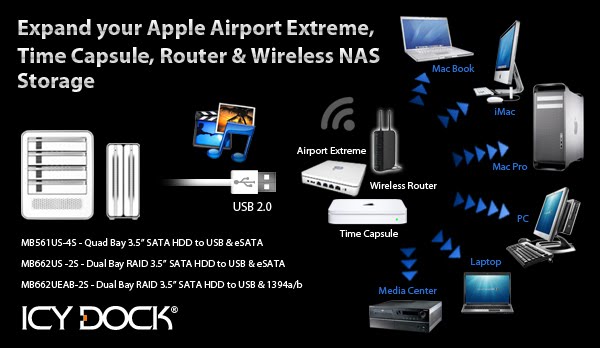
Utilizing a NAS device is a great way to tie all of your computers together in a home or office setting. It allows the users to back up to the same location, share files across the network, and keep the system storage to a minimum, improving each user's performance and overall experience. The downside to most all in one solutions is that they can be restrictive in terms of hardware and storage capacity options. Fear not, for there is a solution. Many wireless routers currently on the market include USB and eSATA ports to allow users to create their own NAS device with a simple external hard drive or even a thumb drive. And, with select routers, these extra inputs will support port multiplication. In other words, they have the ability to act as a hub, so that multiple devices can be used with a single port.

Two such devices are the Apple Airport Extreme Base Station and the Apple Time Capsule.

The Apple Airport Extreme is a dual band wireless router that supports all standards of IEEE 802.11, including the newly published 802.11n. This allows you to share your network with both 2.4 GHz (such as iPhone) and 5 GHz devices (newer Mac or PC systems using 802.11n). The Airport Extreme includes 3 Gigabit LAN ports, and can support up to 50 users at a time. Also on the back, a single USB port, capable of handling multiple devices, such as a printer, or external hard drive, or both, and share them with both Windows and Mac systems. The Apple Time Capsule is nearly identical in features to the Airport Extreme, displaying only a handful of differences. However, the Time Capsule includes a 1TB or 2TB drive, and a USB port that will allow you to expand your network storage even further.

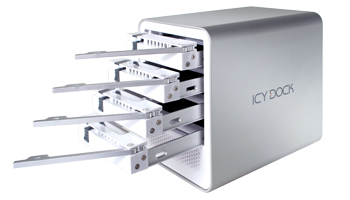
Using an Icy Dock multi-bay hard drive enclosure such as the MB561US-4S quad bay device or MB662US-2S or MB662UEAB-2S dual bay RAID unit will let you create a full on file server with up to 8TB (4TB max with dual bay) of storage capacity. Just choose the speed and capacity of your hard drives, insert them into the dock of your choice, and connect it to your router with the single USB cable, and you now have a full functioning NAS device. Having your drives in a multi-bay enclosure gives you maximum flexibility and easy maintenance of your system. If a drive fails, or you want to add an extra drive to your array, it is extremely simple and easy. Both of our enclosures also feature unique designs and aluminum body construction to keep your drives running as cool as ice, as well as our standard 3 year warranty.

Our multi-bay devices will also work with D-Link routers that have USB inputs and feature their Shareport Technology. One device that stands out is the DIR-655 Xtreme N Gigabit Router. This product features dual band technology, and includes 802.11n Draft 2.0 for maximum network speeds. Similar to the Airport Extreme and Time Capsule, the DIR-655 allows the user to connect a multi-bay device such as the MB561US-4S or MB662US-2S or MB662UEAB-2S and access any of the drives via Windows or Mac systems.

Additional Information on Icy Dock Multi-Bay Products:

MB561US-4S - Quad Bay 3.5" SATA HDD Enclosure featuring USB & eSATA
-Can Handle Up to 2TB in Each Slot
-80mm Removable Fan on Rear
-Built-in Fanless Power Supply
-Mac-like Silver Finish and Polished White Faceplate
-3 Year Warranty

MB662US-2S – Dual Bay 3.5” SATA HDD Enclosure With Built-in RAID, Featuring USB & eSATA
-Can Handle Up to 2TB in Each Slot
-RAID0, RAID1, BIG, SAFE33, SAFE50, and JBOD
-Built-in 40mm Fan with Variable Speed Control
-Screw-less Design
-3 Year Warranty

MB662UEAB-2S – Dual Bay 3.5” SATA HDD Enclosure With Built-in RAID, Featuring USB & FW400/FW800
-Can Handle Up to 2TB in Each Slot (RAID 1 & JBOD only)
-RAID0, RAID1, BIG and JBOD
-Built-in 40mm Fan with Variable Speed Control
-Screw-less Design
-3 Year Warranty


New Product Video and CES 2010 Highlights!

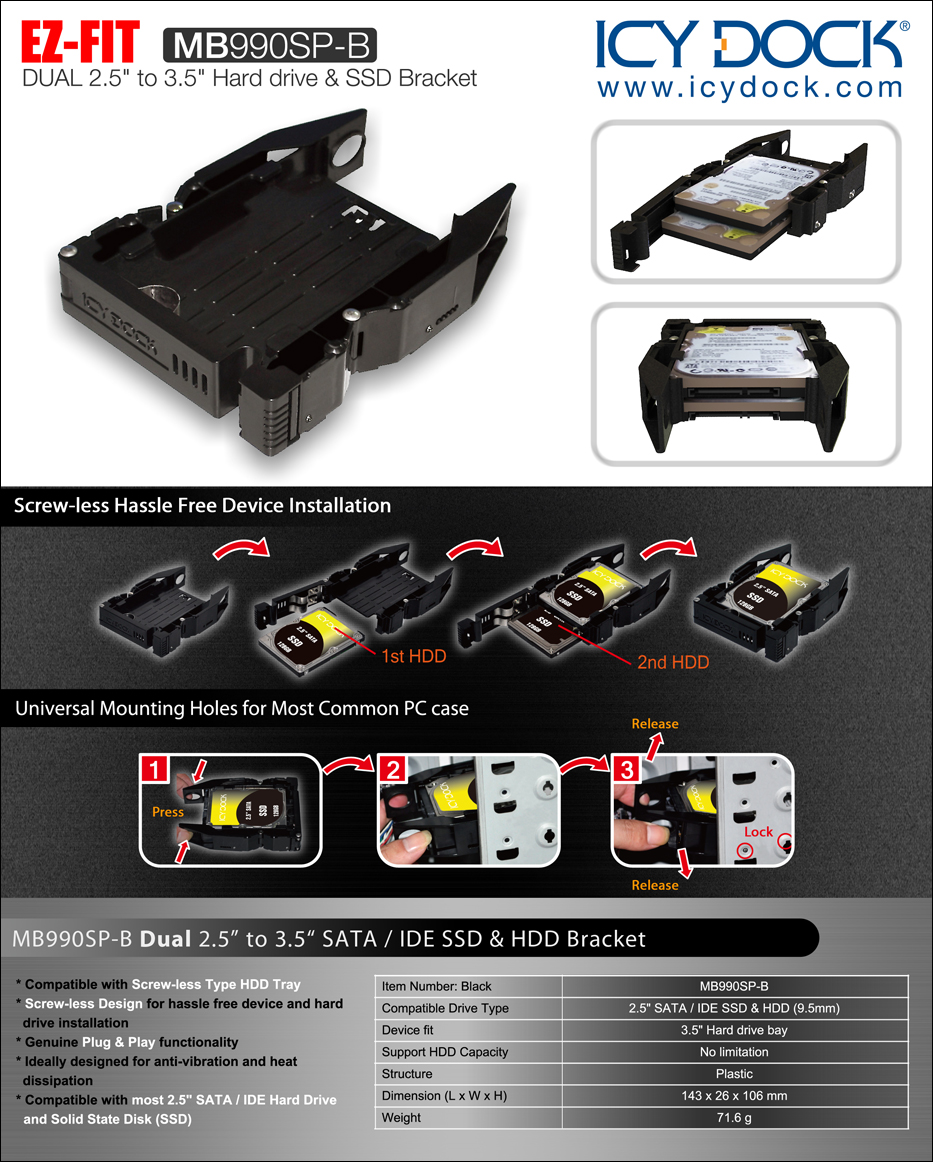
Here is a brand new product video for our recently released MB990SP-B Dual 2.5" SSD Converter Bracket!

* Fits standard 2.5” SATA / IDE SSD and HDD (9.5mm)
* Lightweight constructions
* For use in 3.5” internal drive bay
* Compatible with screw-less type HDD tray
* Genuine Plug & Play functionality
* Unique tool-less design for hassle free device and hard drive installation
* Ideally designed for anti-vibration and heat dissipation
* EZ Fit pins removable for use mounting screw or proprietary tray use

Product Page: http://www.icydock.com/product/mb990sp-b.html

We have put together a highlight page from our CES 2010 Booth, featuring pictures and interviews from a few brave attendees that gave us a minute or two of their time! Thanks again to everyone who stopped by!


Cheers,

Team Icy Dock

Tuesday, January 19, 2010

MB990SP-B Dual 2.5" to 3.5" Converter Bracket for SATA/IDE SSD & HDD

Introducing the Icy Dock MB990SP-B Dual 2.5” to 3.5” SATA and IDE Solid State and Hard Disk Drive Converter. This dual bay drive bracket allows you to use two SATA or IDE SSD and HDD in an internal 3.5” drive bay in most standard cases. Since most cases are not set up to use 2.5” form factor, the MB990SP-B allows you to make a huge upgrade to your system with very little effort.

The bracket will fit most types of cases. Out of the box it can be used in both tool-less and standard cases. The EZ Fit pins on the sides of the bracket fit into most standard mounting holes, and are also removable to use either your case’s proprietary mounting brackets, or to use screws for a more secure fit.

The EZ FIT bracket is extremely lightweight and has an open air design for maximum air flow and cooling of the drives. Most standard 2.5” IDE or SATA drives can be used due to the open back design, allowing use of direct connections to the drive, also giving the user flexibility to mix and match drives.

*Fits standard 2.5” SATA / IDE SSD and HDD (9.5mm)

*Lightweight constructions

*For use in 3.5” internal drive bay

*Compatible with screw-less type HDD tray

*Genuine Plug & Play functionality

*Unique tool-less design for hassle free device and hard drive installation

*Ideally designed for anti-vibration and heat dissipation

*EZ Fit pins removable for use with mounting screws or proprietary trays


MB990SP-B Sales Kit

http://www.icydock.com/product/images/mb990sp-b_kit.jpg

HomeServerShow.com Interview at CES

Greetings all!

Below is an interview we did with Christopher Lux from HomeServerShow.com at our booth at CES 2010. In it, we show off some of our multibay products and our new SSD converters!


Please keep your eye out for more coverage of Icy Dock at HomeServerShow.com in the coming months.


-Team Icy Dock

Tuesday, December 22, 2009

ICY TIP: How To Mount A 2.5" SATA SSD Into 3.5" Internal Drive Bay


In the last five years, the computer industry has seen fantastic leaps in technology. Processors are becoming exponentially faster, hard disk storage is becoming increasingly less expensive, and most of all, flash memory is slowly taking over the data storage market. I am of course talking about solid state drives, or as you may know them, SSD. It yields much faster read and write speeds, and is not limited by the rotational speed of a physical disk. Some top of the line SSDs have reported over 200 MB per second read speeds, and over 100 MB per second write speeds (i.e. Intel X25-M, OCZ Vertex Turbo, Asax Leopard Hunt II T2, Crucial M225 & A-Data S592). This is nearly double that of a single hard disk drive spinning at 7200 RPM.

Click the following link for 2009 Flash SSD charts:

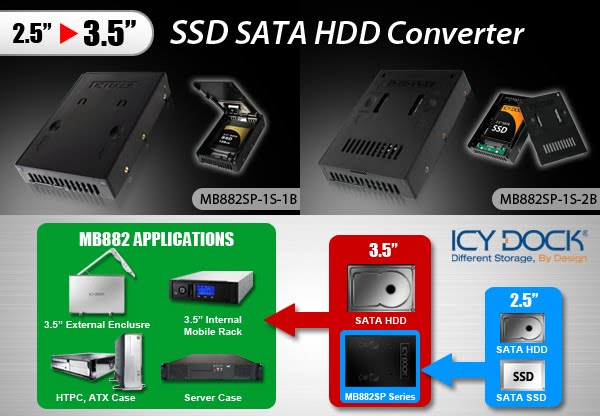
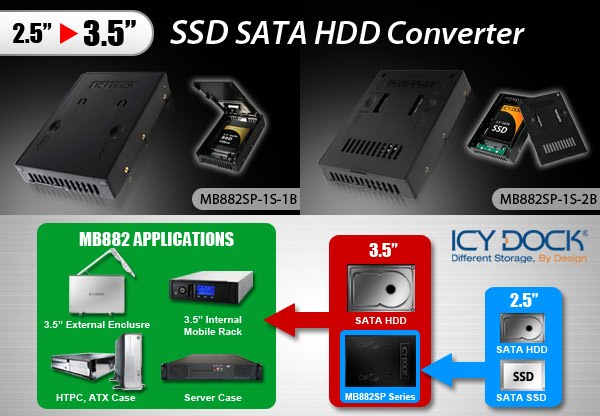
The only problem with integrating an SSD into most current systems is that it conforms to 2.5” form factor, while almost every computer case (i.e. ATX case, Micro ATX case, HTPC case & server case) on the market is only set up to use 3.5” drives internally. To overcome this obstacle, we have created an ideal device to allow users to keep their systems intact, and make a huge system upgrade in a matter of seconds.

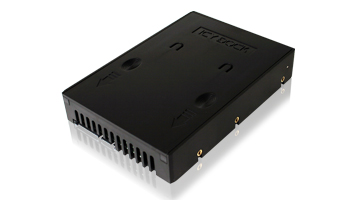
The Icy Dock MB882 Series 2.5” to 3.5” Converter takes any standard 2.5” SATA SSD and transforms it into a standard sized 3.5” SATA drive. Everything is identical to a normal 3.5” hard drive, including dimensions, mounting holes, and connection locations. This allows you to use it with an internal drive bay, a hot swap mobile rack, RAID backplane, or even an external drive enclosure. Utilizing an SSD will increase the overall performance of any system. Whether you are a power user who likes to have multiple operating systems, or a video editor who needs every resource working at its maximum potential, there are benefits to be had.

Hundreds of thousands of units have been sold in just the short year it has been on the market. And with flash memory steadily becoming more affordable for users, there is no reason to hold out on giving your machine the upgrade it deserves.

ICY DOCK MB882SP-1S-1B Product Page

ICY DOCK MB882SP-1S-2B Product Page