Thursday, August 05, 2010

New Product Announcement - MB994SP-4S Quad Bay 2.5" SATA/SAS Backplane


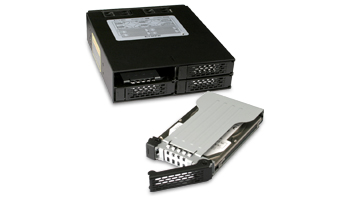
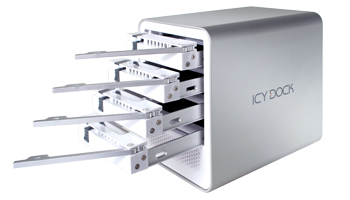
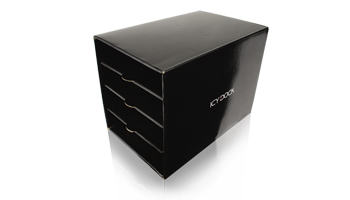
Introducing the Icy Dock MB994SP-4S Quad Bay 2.5" SATA/SAS Mobile Rack for use in a single 5.25" device bay. This product is constructed of heavy duty metal to hold up in the toughest of conditions. It includes ventilation slots on the front, back, top and bottom for maximum airflow to keep both SATA and SAS drives running cool, and an LED is placed on the front of each drive tray to give the user drive status at all times. Dual 4-pin power connectors are used to ensure a consistent power supply to all 4 drives, whether they are low power SSD’s or power hungry 15000 RPM SAS drives. Also included are dual 40mm cooling fans to keep the drives running in at optimal temperatures in even the most intense applications.


Utilizing its small form factor, The MB994SP-4S is perfect for use in industrial PCs, servers, or any small form factor case where 5.25” bays are limited and large drive capacity is needed, especially compact RAID 5 systems. It is built to function in the most demanding environments including military and law enforcement deployment, as well as manufacturing conditions such as embedded control systems and factory automation systems. The heavy metal design makes it ideal for placement in rugged environments.

MB994SP-4S Features:
* Fits 4 x 2.5" SATA I / II / III and SAS HDD/SSD
* Accommodates Drives with up to 15mm Height
* Fits 4 Drives into a Single 5.25" Device Bay
* Status LED on Front for Each Drive
* Full Metal EZ Slide Mini Tray System with Full Cage Design
* Small Form Factor Perfect for IPC, Servers, and Small Form Factor Cases.
* Front, Rear, Top, and Bottom Ventilation Slots
* Heavy Duty Full Metal Construction
* Support SATA 6Gbps
* Top Cover for the Tray Adds Extra Drive Protection

Product Page:

Contact Info:

About ICY DOCK:

Home Page:

Monday, July 19, 2010

Icy Tip: Easily Install Dual 2.5" SSD or HDD Into Your Antec 1200, Cooler Master HAF 932, and ThermalTake ArmorPlus ATX System Case With the Icy Dock MB990SP-B


With today's current technology, you can build a PC from scratch that is fully customized to your specific needs. As a passionate gamer, you know that building a superior PC is not too difficult. You've already picked out your Asus P6X58D Premium Desktop board and Antec Twelve Hundred computer case...so now it's time to decide on a type of data storage! If you're a serious gamer, you'll know that a solid state drive (SSD), such as the Crucial RealSSD, would be the most optimal choice considering its impressive read and write speeds. However, the only problem with a SSD is that they are usually confined to the 2.5" form factor size. You hate dealing with the inconvenient brackets and mounts so what do you do?


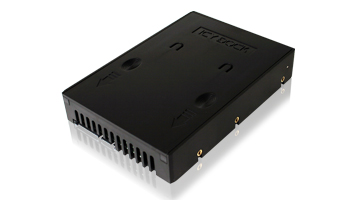
The ICY DOCK MB990SP-B dual bay drive bracket allows you to mix and match two, yes we said two, standard 2.5" size SSD, IDE or SATA drives in an internal 3.5" drive bay. This EZ fit dual 2.5" to 3.5" HDD bracket features a state of the art "screw less" design that will save you time and frustration during installation. Rather than dealing with six to eight screws and multiple mounts for each drive, the MB990SP-B allows you to install up to two drives within seconds!


The MB990SP-B is also constructed using lightweight plastic and utilizes an open air design allowing maximum air flow for superior drive cooling. Since most computer cases are not set up to use 2.5" form factor, the MB990SP-B allows you to make a huge upgrade to your system with very little effort and at a very affordable price! 

Click below for more info on the MB990SP-B:

Recommended Computer Cases:
Antec Twelve Hundred  (Confirmed compatibility) 
COOLER MASTER HAF 932 (Confirmed compatibility) 
Thermaltake ArmorPlus (Armor+) VH6000BWS (Confirmed compatibility) 

Recommended SSD:
Intel X25-M
OCZ Vertex Turbo
Super Talent Ultra Drive ME
Crucial M225 & Crucial RealSSD
Kingston SSDNow 

Needs compatibility check: 
XCLIO Windtunnel Fully Black Finish 1.0 mm SECC Chassis
AZZA Solano 1000 Black
Corsair Obsidian Series 800D CC800DW


Friday, July 02, 2010

New Product Announcement - MB668U3-1SB 2.5" SATA Mobile Enclosure with USB 3.0


Icy Dock is proud to announce a game changing product in its line-up: the MB668U3-1SB USB 3.0 Mobile Enclosure. This device handles most standard 2.5" SATA HDD and SSD and allows the user to connect it to their system using SuperSpeed USB3.0 for transfer rates up to 5 Gb/s! For systems which have not yet upgraded to USB 3.0, the MB668U3-1SB is backwards compatible to use with any USB 2.0 port on Mac or PC systems.

The MB668U3-1SB is predicated off the popular MB668US-1SB and MB668U-1SB, featuring an ultra light weight aluminum construction that draws away the heat, and a hassle-free installation method; no tools or screws are required to insert a drive into the unit. On the front of the device is a cool blue LED to notify the user of the drive's status, and is seen through ventilation slots that maximize airflow across the drive.

Finally, on the rear of the device, a micro-USB 3.0 port and a DC in connection to use the USB-to-DC cable which is included with the device. This is to use with some larger capacity drives which may require additional power.

Product Features:
* Fits any standard 2.5" SATA HDD or SSD (Standard 9.5mm Thickness) 

* SuperSpeed USB 3.0 connection for 5 Gb/s transfer rates
* Maximum transfer rate up to 480 Mbps via USB 2.0
* Backwards compatible USB 2.0 or 1.1 for universal connectivity on Mac and PC
* Plug & Play without rebooting the computer
* User friendly Screw-less design just plug in the hard drive and play
* Stylish aluminum construction provides protetion, mobility, and optimal cooling
* Built-in blue LED. Less bright, less visible, less annoying
* Leather pouch included to keep your drive clean and scratch-free
* Included "DC to USB A Type" power cable for high performance HDD usage.


MB668U3-1SB Product Page
Request an Review Sample

Thursday, June 17, 2010

New Product Announcement - MB991IK-B 2.5" SATA/SAS Mobile Rack

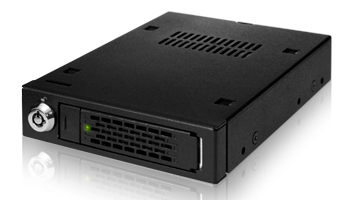
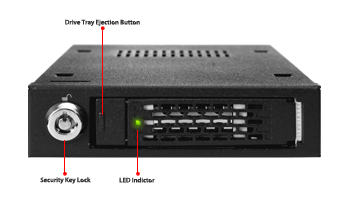
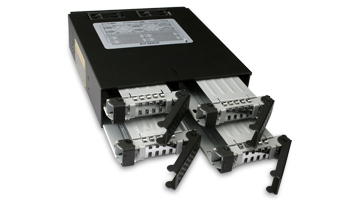
Introducing the Icy Dock MB991IK-B 2.5" SATA/SAS Mobile Rack for use in 3.5" device bays. This product is constructed of heavy duty SECC metal to hold up in the toughest of conditions. It includes ventilation slots on the front, back, top and bottom for maximum airflow to keep both SATA and SAS drives running cool, and an LED is placed on the front of the device to give the user drive status at all times. 

The MB991IK-B also utilizes our brand new EZ Slide Mini Trays, making drive interchangeability and maintenance completely hassle free. The trays are built using SECC so that they are durable for many lifetimes, but will not weigh you down when transporting your data from system to system. The trays are also designed to accommodate 9.5mm, 12.5mm, and 15mm drives giving you the ultimate universal 2.5" hot swap bay.

Both SAS and SATA drives are compatible, allowing users to use low power 5400 rpm drives, or 15000 rpm powerhouses, making this product valuable to end users and enterprise server deployment. Similarly, the MB991IK-B supports the new SATA 6Gbps interface for ultra high bandwidth. For enterprise users, a key lock is included to keep your data safe and secure inside the enclosure even if the entire system has been stolen.

Product Features: 
* For 2.5" SATA and SAS HDD/SSD
* Fits 3.5" Device Bay
* Status LED on Front
* EZ Slide Mini Tray System
* Accommodates Drives with up to 15mm Height
* Front, Rear, Top, and Bottom Ventilation Slots
* Heavy Duty SECC Construction
* Support SATA 6Gbps


For further questions and information, please contact us using tech@icydock.com.

Cheers,

Team Icy Dock

Wednesday, June 16, 2010

Icy Dock and HomeServerShow.com Wallpaper Contest

Hello all!

The wallpaper contest that was hosted by our friends at HomeServerShow.com has come to an end and we have the results for you!

To preface, the images shown on this page are the low resolution versions, while the link below will allow you to download the high resolution 1920 x 1200 image for use on your desktop.

1st Place


2nd Place


3rd Place


Honorable Mention


A very big thank you to all of our creative entries! No doubt that these will be on our desktops here at the office!

Also a big thank you to Home Server Show! They handled everything perfectly!

For all your Windows Home Server interests, check out HomeServerShow.com for a podcast, forum, and blog on the latest hardware, software, tips and tricks.

Cheers,

Roland
Team Icy Dock

Thursday, May 27, 2010

Free MB663UB-1S-1 2.5" SATA Mobile Enclosure!


Greetings ICY DOCK Users!

Here is a chance to get some free products! We are looking for all Icy Dock users, especially professional users who work with various types of media such as music, photos, and video. We want to hear your thoughts about Icy Dock products; design, features, etc. Additionally, for our professional users, send us some information about you and the work you do. See below for a sample of what we are looking for. 

In return for your generosity, we will send you a 2.5" mobile enclosure for free! Available while supplies last.

If you would like to be featured, please send an email to tech@icydock.com, and please include the following:

For all users, please include items 1 and 6, or more if desired. For professional users, please include all or most of the items.

1. Name (or Alias) and location
2. Profession
3. A link to your website
4. Noteworthy projects or work you have done
5. A paragraph or two describing yourself and your work
6. A paragraph or two describing your experience with Icy Dock product(s)
7. A picture you would like displayed (yourself, a logo, or work that you have done)

ICY DOCK Testimonials Page Sample:


As we receive responses, we will be adding them to our page. Once our new website is complete, the page will be carried over.

Free gifts will be sent out with 4-6 weeks of receiving the entries. And remember, there are limited quantities. Gifts are limited to the USA only.

Please feel free to contact us with any questions, comments, or concerns. We very much look forward to hearing from all of you!

Cheers,

Team Icy Dock

Friday, May 21, 2010

Icy Tip: A Small, Cost Effective Server for Your Home or Small Business to Host Files and Other Media

Setting up your own file server is no easy task. Normally, people go the route of using an old PC or they build a new one from the ground up. Then comes choosing the right operating system and setting it all up. This process can take a single day, or weeks depending on the user's technical skill level.


The folks over at Code Lathe have made things much, much simpler. Using their TonidoPlug, a user can have a file server complete with software and hardware up and running in less than an hour. All you need is the TonidoPlug and a USB storage device, such as the Icy Dock MB561US-4S-1.


Our friends at Code Lathe were kind enough to send us an evaluation unit to test out with the MB561US-4S-1, and we have written a small review to touch on the many features the plug has to offer.

What is a TonidoPlug?

TonidoPlug is a tiny, low-power, low-cost home server and NAS device powered by Tonido software that allows you to access your apps, files, music and media from anywhere.

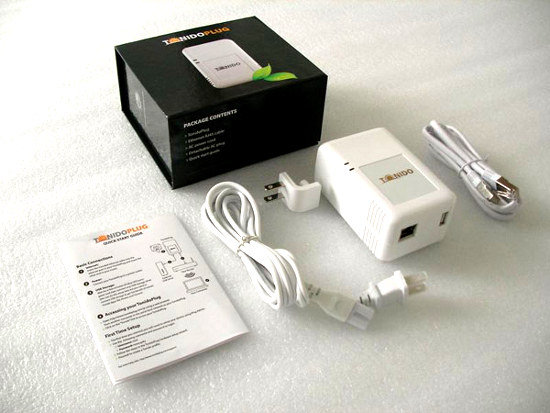
(Contents of the box) 

Initial Thoughts
After opening up what I can only describe as a very elegant box, I discovered that the plug was smaller than I anticipated. It included the power cord and Ethernet cable, and the plug itself, along with some documentation and simple instructions on how to set it up for the first time.

One thing I noticed that I was not aware of was the plug's ability to use a power cord which connected to the top of the plug, rather than the back. That being said, it also comes equipped with rubber feet on the backside so that it can lay on a desk or shelf. To me, this was a relief. I was trying to figure out how I would situate the device without it being behind my desk or just being stuck on the wall. Things were looking good already.

Setting It Up

Getting the plug up and running for the first time could not have been simpler. As I mentioned, the packaging included a small instruction sheet for setting it up the first time. You enter in a URL in your browser which detects a TonidoPlug on your local network. Now if for some reason the plug is not detected, like in my case, there is an easy way to manually find it. Using the MAC address on the back of the device, you can search for it rather than having the software automatically detect it.

After this, you enter your Tonido software running on the plug and go through the standard set up; setting a password and account name, network settings, etc, etc. The account name chosen is how you access your server. (e.g. icydockusa.tonidoid.com)

Finally, setting up our MB561US-4S-1 Quad Bay External Enclosure was the easiest part. After getting the 4 drives attached to the EZ Slide trays, we loaded them into the box and then connected the USB 2.0 cable to the plug. The power was switched on, and the 4 drives, formatted using NTFS, were instantly connected and ready to go.

Interface and Features

We tested the TonidoPlug using our MB561US-4S-1 with four 3.5” HDDs, each one with a different capacity. To get the most out of our enormous storage space, we decided to load up each drive with a different type of media. There was no method to this madness; it was simply random files and file types on each drive. However, having 4 drives does allow for better organization, separating them by file type or media. For example, a user could have separate drives for movies, pictures, music, and documents. 

The first thing to notice is the interface. It is a very user friendly, and an extremely clean and pleasant design. Each feature is clear to the user, and is organized neatly.

(Home screen of web interface)

Now, to view all storage devices connected to the plug, we can use the explorer application, which gives the user the ability to browse all drives and their contents.

(View of all mounted volumes in Explorer)

Using explorer, the user can also create folders, download files, and upload files from the machine they are using. Also, looking to the left in the picture above and below, you can see quick links for commonly used actions such as share, rename, copy, and delete. These quick links are shown for each file, folder, and drive when using explorer, making it very easy to manage your data.


(View of single volume in Explorer)

Needless to say, the people at Tonido have gone through great lengths to make a beautiful and fully functioning piece of software. Everything can be done through your browser, from anywhere with an internet connection. However, to make it even easier for you, using WebSharePro (included free with the Plug, but $15 otherwise), you can create a shared volume or folder that can be mounted as a local drive. To show this, I created a shared volume with one of the drives and named it “usb” and allowed a user of name guest to have download and upload capability.

(Setting up a shared folder in WebSharePro)

(Shared folder mounted in Mac OS X)
  
As you can see above and below, the drive mounts as if it were a normal drive connected to the computer, allowing you to manage your files with Finder in Mac OS X or Explorer in Windows operating systems.

 (A screenshot of an upload in progress)

What this review does not touch on is the other countless features and applications included in the Tonido software suite. Below is a list along with a short description of some of the applications that I thoroughly enjoyed playing around with.

Torrent: Allows the user to download torrents directly to the plug’s USB storage. Start, pause, and stop transfers, and manage the network settings like upload and download speeds.

Jukebox: Make your entire music library available via the Tonido interface. Make playlists and share them with anyone.

Money Manager: Create a financial profile that lets you track your expenses and assets.

Photos: Upload your photo library and share it with anyone. Also included is the ability to create photo albums and slideshows.

Back Up: Fully functional back up utility. It has potential to be a RAID1 alternative by having a drive connected to the plug mirror itself to another drive connected to the plug. 

Final Thoughts

Icy Dock approved! Here at Icy Dock, we have a very high standard of quality that we adhere to, and the TonidoPlug has met our expectations. I consider the entire software suite and hardware to be something I would be happy with, however there are some features I wouldn’t mind seeing in future releases of the software and hardware that could sweeten the deal.

Software

*Document editor for quick edits.
*A RAID 1 type of setting for USB storage. Obviously this can be done utilizing Back Up, but a preset function would be nice too.
*Improved browsing capability for Jukebox, something similar to iTunes or Windows Media Player; browse by artist, song, or album.

Hardware

*An eSATA port. Port multiplier support is not necessary, but would be welcomed if possible.
*An additional USB port. Getting away from a hub with a power supply would be ideal, especially if one wanted to connect a couple of mobile drives to the plug.

Obviously these are more personal preferences however I am sure other users are looking for some of the same things.

For more information, please check out the Tonido (www.tonido.com) and the TonidoPlug (www.tonidoplug.com) websites for more information. I also highly recommend following the CodeLathe blog (http://www.codelathe.com/blog/) for Tonido software and hardware updates.

A huge thank you to Tonido for giving us the opportunity to play with the TonidoPlug and see how great it really is!

Cheers,

Team Icy Dock
Tuesday, May 18, 2010

HomeServerShow.com Hosts the Icy Dock Wallpaper Contest!


Our good friends over at HomeServerShow.com are hosting an Icy Dock wallpaper contest. There are some great prizes, especially for those of you looking to beef up your home or small business server. Here are the details:
Contestants have a chance to win one of three prizes. To be eligible, contestants must submit an original desktop wallpaper highlighting Icy Dock and/or their products. The wallpaper is to be 1920x1200 pixels and sent as an attachment or link to podcast@homeservershow.com by June 7, 2010. Winners will be selected by the hosts of the Home Server Show Podcast and announced in June 2010. Wallpaper submissions will be posted on the HomeServerShow.com and discussed in the forums.
Prizes:
1st – MB561US-4S-1 External USB & eSATA Multibay


2nd and 3rd – Choice of MB668US-1SB 2.5” external SATA to USB Single Bay enclosure or MB882SP-1S-1B 2.5” to 3.5” Internal SATA adapter


Honorable Mention (Limited to 10) – Origami Hard Drive Case


Selected wallpapers will be featured on the HomeServerShow.com. Winning entries may be hosted on the IcyDock website for promotional purposes. By submitting an entry you agree that IcyDock and/or HomeServerShow.com can use your submission for promotional purposes.
Submit your entries to podcast@homeservershow.com by June 7, 2010. You can e-mail the wallpaper or a link to it. HomeServerShow.com will get them posted to the forums for all to see. If your not a graphics artist expert don’t worry about it! We want to see your submission!
For more information, please check out the blog post at HomeServershow.com.

We look forward to some very creative entries!

Cheers,

Team Icy Dock

Thursday, May 13, 2010

Like Our Page on Facebook and Win!


We recently started a Facebook Page for Icy Dock USA. In light of this, we are holding a little contest that allows you to win some of our products. All you have to do is click a few buttons!


Step 1: Like us! Click the button at the top of our Facebook Page to become a fan.


Step 2: Suggest this page to all of your friends! 


When the Page hits different milestones, we will be giving away free products!


@ both the 250 and 500 marks, we will hold a drawing and the winner can choose any single bay unit to have.

@ the 1000 mark, we will hold a drawing where the winner can choose ANY product in our lineup!

We have a big
 summer coming up, packed with all kinds of new products, so this is a great opportunity to win top of the line storage devices!


If you have any questions, please feel free to contact us at tech@icydock.com.


Cheers,


Team Icy Dock


Tuesday, April 13, 2010

Professional User Invitation

Greetings Icy Dock Users!

2009 was a great year for Icy Dock. We launched several new products, opened a branch in Germany, and expanded our market share in the storage device industry. We also noticed a growing trend throughout the year. Many of our professional users who work with video, photos, and music were referred to us by their colleagues, who inevitably were happy with their Icy Dock product or products, and felt the need to share their experience. For this, we thank you. Without this word-of-mouth marketing, we would not have been able to grow like we did this past year.

To show our appreciation, we have decided to set up a page on our website dedicated to our professional users and their work, or shall we say art. This page will be placed on our current site, as well as carried over to our brand new site which will be launching in the near future.

We are looking for all Icy Dock users who work with various types of media primarily music, photos, and video, any and all aspects, whether you are the recording engineer, or the musician, we want to show you off to the world! We want to give you the opportunity to share your work via our page and gain extra exposure for your talents.

If you would like to be featured, please send an email to tech@icydock.com, and please include the following:

1. Name
2. Profession
3. A link to your website
4. Noteworthy projects or work you have done
5. A paragraph or two describing yourself and your work
6. A paragraph or two describing your experience with Icy Dock product(s)
7. A picture you would like displayed (yourself, a logo, or work that you have done)
ICY DOCK Professional Testimonials Page Sample:


As we receive responses, we will be adding them to our page. Once our new site is complete, the page will be migrated to the new site as well.

Please feel free to contact us with any questions, comments, or concerns. We very much look forward to hearing from all of you!

Cheers,

Team Icy Dock